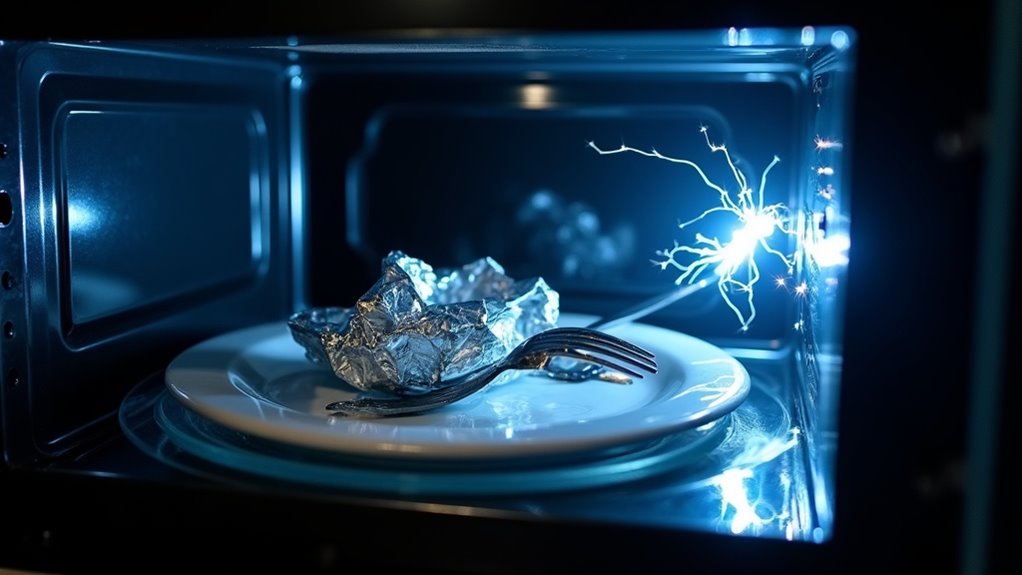
Sparks inside a microwave happen when metal, food particles, or damaged components create electrical arcs. Tiny chips in dishes or bits of food grease can concentrate microwaves and trigger visible sparks. Exposed or flaking metal, torn waveguide covers, and worn interior coatings also produce arcing. Even small metal trims on containers or recycled twist ties cause sharp flashes. Recognizing these common causes helps prevent damage and keeps microwave use safe and effective.
What Causes Microwave Sparking?
In case your microwave starts sparking, don’t panic, because the cause is often simple and fixable.
You might be seeing microwave interference from metal, like foil, utensils, or dishes with trim, because they reflect energy and create tiny arcs.
Even food splatters, grease, or crumbs can heat up, turn conductive, and flash.
Should the sparks keep coming, look at the waveguide cover and the inside walls.
A dirty, burnt, or chipped spot can weaken electromagnetic shielding and let energy hit exposed metal.
That can make the same spark return again and again.
Sometimes the problem comes from worn paint, but other times it’s inside the machine, where loose parts or failed high-voltage pieces need a pro.
Check for Metal Inside First
Start with the inside of the microwave, because metal is the most common reason a unit sparks. You can use quick metal sensing by scanning every dish, tray, and corner before you restart it.
Should you spot foil, a twist tie, or a container with shiny trim, take it out right away. Your safety checklist should also include racks, since only the maker’s approved rack belongs in the oven and only in the right spot.
Then look for tiny bits, because even a crumpled edge can spark and feel bigger than it looks. Plain metal cookware could work in rare models, but sharp edges or points can still arc.
Should sparks start, stop the microwave, stay calm, and check again together.
Why Foil, Utensils, and Trim Arc
Foil, utensils, and shiny trim can all spark in a microwave because they don’t handle the energy in a smooth way. Whenever you use thin foil, its wrinkles and sharp edges pack charge into tiny spots, so air can ionize and flash. Metal forks, spoons, and twist-ties act as conductors, and currents can bunch up at points or broken ends.
| Item | Why it arcs |
|---|---|
| Foil | Sharp edges focus charge |
| Utensils | Current gathers at tips |
| Trim | Reflects waves and sparks |
That’s why foil aesthetics and utensil ergonomics matter whenever you’re choosing what goes in. Gold or silver trim can make standing waves, and small metal bits can heat fast. Provided a rack sits too close to the walls, narrow gaps can also start repeat sparks, which feels alarming but makes sense.
Look for Food Splatter and Grease
Check the microwave walls, ceiling, and corners for food splatter and greasy spots, since those leftovers can heat unevenly and start sparks.
Should you see brown or black burn marks near the waveguide cover or vents, that’s a sign the residue has already been arcing.
A quick wipe with a damp cloth and mild detergent can usually clear the buildup and help keep your microwave calm again.
Food Splatter Buildup
Food splatter and grease can hide in plain sight inside your microwave, and that small mess can do real damage. Whenever you skip wiping it down, residue can build up on the walls, ceiling, and vents, hurting microwave ventilation and causing odor retention. Then the food bits can soak up energy, heat too fast, and spark.
- Check the same spot each time sparks appear.
- Clean around the waveguide cover and seams.
- Wipe away splashes before they dry hard.
- Stop using it provided sparks keep coming back.
You’re not being picky by cleaning often. You’re protecting your kitchen and keeping your microwave safe for the people you care about. In the event a quick wipe doesn’t stop the arcing, let a qualified technician inspect it.
Grease Burn Marks
Grease burn marks are a loud warning sign, even while your microwave is still running. You might notice brown or black spots on the ceiling or waveguide cover, and they usually mean oil or food residue has been heated again and again until it reached ignition.
The grease composition matters, because fat and sugar can turn into stubborn hot spots that invite spot ignition whenever energy concentrates there. Should you see charring, tiny holes, or repeated marks, the surface could already be damaged and sparks can start from that area.
You don’t have to panic, but you should act fast. Wipe away splatter after use with a damp cloth and mild detergent, and you’ll cut the chance of more arcing and keep your microwave feeling safe to use.
Clean Waveguide Cover
A small mica shield can hide a big problem as soon as your microwave starts sparking. Check the waveguide cover on the side or ceiling, because food splatter and grease can soak it, burn, and cause arcing. You’re not alone provided this feels annoying; this fix is often simple.
- Unplug the microwave initially.
- Wipe the cover with a damp cloth and mild detergent.
- Skip abrasive scrubbing so you don’t tear the protective coating.
- Look for brown marks, black scorch spots, cracks, or missing pieces.
Should the sparks stop after cleaning, you likely found the issue. In case they keep going, or the cover looks damaged, choose a mica replacement before you use the oven again. These parts are cheap, but inside electrical faults need a pro.
Inspect the Waveguide Cover
Next, inspect the waveguide cover on the inside wall or ceiling of your microwave.
In case you see brown or black scorch marks, tears, charring, or melting, you’ll need to clean it or replace it right away because damage there can cause arcing.
Keep the cover in place and gently wipe it with a damp cloth, but should sparking continue, swap it out before you use the microwave again.
Waveguide Cover Damage
Should sparks show up inside your microwave, the waveguide cover is one of the initial places you should inspect. This thin silver or white panel protects the waveguide, and it also supports microwave aesthetics and material durability. Whenever it cracks, warps, tears, or gets badly stained, microwaves can hit internal parts and make sparks.
- Look for brown scorch marks around the cover.
- Check for a burning smell after use.
- Notice whether the panel feels loose or bent.
- Replace it whenever you see damage, not delay.
A small replacement cover usually costs only a few pounds, and you can trim aftermarket kits to fit. Still, unplug the microwave beforehand and match the size carefully. Should sparking keep happening, stop using it and call a qualified technician to check the magnetron, diode, and capacitor.
Clean The Cover
Before you reach for a replacement, take a close look at the waveguide cover and clean it initially, because grease and food splatter can turn that small panel into a spark source.
To begin, unplug the microwave so you stay safe. Then find the mica panel, usually on the right side inside the cavity. Use a damp cloth with mild detergent, or gentle solvents made for mica maintenance, and wipe away every bit of residue.
Check for brown or black marks, cracks, tears, or heavy scorching. In case you see damage, replace the cover instead of reusing it, since a cheap new one can protect the oven better.
After cleaning or swapping it, heat a cup of water briefly. Should sparks keep showing up, stop using the microwave and call a qualified technician right away.
How a Dirty Waveguide Cover Sparks
A dirty waveguide cover can spark because it stops doing its quiet shielding job the way it should. Whenever grease, crumbs, or moisture sit on that mica surface, they absorb microwave energy and heat unevenly. Then tiny arcs can flash across the cavity wall, and you see sparks. You’re not alone provided this feels alarming, but it’s often fixable. Clean the cover after you unplug the oven, and you help protect microwave insulation and support mica longevity.
- Wipe away splatter with a damp cloth and mild detergent.
- Check that the cover stays dry after each use.
- Keep food from bursting onto the right or top wall.
- Replace a damaged cover whenever sparks keep returning.
Watch for Burn Marks and Tears
Burn marks can tell you a lot about what’s happening inside your microwave, and they’re usually hard to miss once you know where to look.
Should you see brown or black marks on the waveguide cover or interior walls, you’re likely seeing signs of past arcing. Even a tiny scorch spot can mean exposed metal underneath, which can spark again whenever energy builds there.
Tears, holes, or missing pieces in the mica cover are more serious, because they let food debris and moisture reach the magnetron area. During preventive inspections, check for these clues right away.
A single mark on one side often points to trapped debris or a damaged cover, not a total failure. That’s why material improvements matter too.
Should you spot charring or tears, stop use, unplug it, and get help.
Check for Chipped Interior Paint
Check the inside walls of your microwave for chipped paint, because even small bare spots can expose metal and trigger sparks.
Whenever food splatter or grease collects on those spots, it can burn and leave a conductive path that makes arcing more likely.
Provided you see chips, stop using the microwave and have it repaired or replaced, since a quick touch-up usually won’t make it safe again.
Chipped Paint Risks
Even a tiny chip in the microwave’s interior paint can open the door to trouble, because it exposes the metal cavity underneath.
- A bare spot can focus microwave energy and start sparking.
- Grease or splatter can burn onto the chip and make a conductive path.
- Small chips might spark only sometimes, so the problem can hide.
- Deep pitting, rust, or burn marks mean you should stop using it.
If you spot this, consider paint remediation fast. A qualified tech can judge whether a protective coating or a repair makes sense.
Don’t keep probing it yourself, since the high-voltage parts aren’t safe to check. Unplug the unit and get help. That step protects you and helps you stay in the safe, confident group of people who fix small issues before they grow.
Exposed Metal Arcing
A chipped spot inside your microwave can do more than look a little rough, because it could expose bare metal and set up visible arcing.
Whenever you see sparks from the same place, the cavity might be catching microwave energy at a sharp edge. That tiny break can come from paint adhesion problems or metal fatigue, and even a few millimeters of damage can matter.
Food splatter can then stick there, turn conductive, and make the sparking repeat.
Replace Or Repair
In case you spot chipped paint inside your microwave, don’t brush it off as a small cosmetic flaw, because bare metal can turn that little spot into a spark point. Unplug it initially, then check the ceiling, waveguide area, and any burnt marks.
- Ask yourself whether the chip is tiny or whether the cavity looks pitted.
- Watch for intermittent sparks that show up only whenever food sits in one spot.
- Do a quick cost analysis before you spend money on repair.
- Review warranty options, since coverage could change your next step.
If the damage is severe, cosmetic touch-ups won’t help much. A technician can examine the high-voltage parts and tell you whether repair makes sense or whether replacement is safer. Whenever you compare options, you’re not being fussy, you’re protecting your kitchen and the people who use it.
When Sparking Means Internal Damage
Assuming your microwave keeps sparking after you’ve removed every bit of metal, that’s not something to shrug off. You might be facing internal damage, and quick microwave diagnostics can help you spot component failure before it gets worse.
In case you see brown scorch marks, a burned or missing waveguide cover, or chipped enamel with bare metal showing, the oven can arc inside the cavity. That means the problem isn’t a stray spoon anymore.
Intermittent sparks that change with food size or placement can also point to a damaged area, not a one-off mistake. Should cleaning or replacing the cover not stop it, call a pro. High-voltage parts can fail, and that brings real fire and shock risk.
Why It Sparks Only Sometimes
Sometimes your microwave sparks only whenever a metal flake, foil edge, or shiny trim shifts into the right spot as the turntable moves.
Other times, tiny food bits or grease land in just the wrong place and heat up enough to arc for a moment.
Intermittent Metal Contact
A microwave can feel a little unpredictable provided it sparks only on some runs, but that pattern usually points to a changing contact point inside the oven.
Whenever you use microwave maintenance and notice this, check your user habits too, because tiny metal bits can shift with the dish and touch the field only sometimes.
- A foil flake might ride along with food.
- A chipped paint spot can meet grease on one cycle.
- A loose mica cover can move just enough to expose metal.
- A hot spot can line up with crumbs and spark.
You’re not doing anything wrong, and that can ease your worry.
The oven just reacts to what touches it in the moment, so the spark appears, then disappears, like a bad joke with timing.
Variable Debris Placement
Whenever a microwave only sparks on certain runs, the cause is often hiding in plain sight, because a tiny bit of debris doesn’t stay in one place every time. You’re not imagining it. Random debris, like a speck of dried grease or food, can ride along with different dishes and land near the waveguide cover. That positional variability matters.
| Debris spot | Spark chance |
|---|---|
| Cover edge | Greater |
| Ceiling speck | Greater |
Once the speck sits in a hotspot, it can absorb energy and flash. In a microwave, even a millimetre-size bit might spark about 1 in 10 starts. Should you also have a loose cover or a tiny chip in the metal, the same meal could spark one day and stay quiet the next. That inconsistency feels annoying, but it usually means the debris moved, not that you did something wrong.
Is a Sparking Microwave a Fire Risk?
Yes, a sparking microwave can be a fire risk, and the danger depends on what’s causing the spark. Should a tiny spark comes from foil or metal packaging, you usually don’t face an immediate fire, but repeated flashes can light grease or cardboard. Whenever sparks keep happening, your microwave might’ve a deeper problem, and that raises insurance implications too.
- Hot spots can turn crumbs into flame.
- Burn marks point to unsafe surfaces.
- Faulty parts can cause sustained arcing.
- Fast action supports emergency response and safe evacuation procedures.
What to Check Before Restarting It
Before you try the microwave again, unplug it and take a slow look inside, because a missed metal spoon or a strip of foil can keep the sparking going.
Then move through your safety checklist: remove any utensils, twist ties, metalized film, takeout containers, or dishes with metallic trim.
Check the waveguide cover for brown or black scorch marks, cracks, or missing pieces.
Also look for food debris, grease, or splattered residue near that spot, since it can flare up again.
Next, inspect the interior paint for chips, bare metal, deep pitting, or rust.
Should you find damage, stop there and arrange repair or replacement.
After cleaning, use preventive maintenance and evaluate it briefly with a cup of water.
How to Clean the Cavity Safely
Gently cleaning the cavity can make a big difference, because even a small bit of grease or food splatter can keep causing trouble. Unplug your microwave initially, then let it cool so you stay safe.
Next, remove the turntable and rollers, and wash them in warm soapy water; dry each piece completely before you put them back. Then wipe the cavity walls, ceiling, waveguide cover area, and door seals with a damp cloth and mild detergent. This supports ventilation maintenance and seal conditioning, too.
- Check for stuck crumbs
- Clean soft corners gently
- Inspect the mica cover closely
- Dry every part fully
After that, run a cup of water for 30 to 60 seconds. Provided it smells or sparks, you’ll know your cleaning needs another look.
Replace the Cover or Call a Technician
Should your microwave still spark after you’ve cleaned the cavity, the waveguide cover is the next place to check. In case you see brown burn marks, cracks, or holes on that silvery panel, replace it right away. A damaged cover lets arcing start and can let crumbs reach the magnetron. You can often buy a low-cost mica plate kit and trim it to fit, but unplug the microwave initially and make sure the new cover sits clean, dry, and snug.
Should the sparking keep going, or you notice scorch marks, chipped paint, or strange buzzing inside, stop using the microwave. That’s when a professional inspection makes sense, especially with warranty considerations. Never open high-voltage parts yourself. A qualified technician can evaluate the capacitor, diode, and magnetron safely, and that peace of mind matters.
Frequently Asked Questions
Can a Microwave Spark if It’s Empty?
Yes, you can get sparks in an empty microwave, and about 1 in 5 sparks come from concealed residue. You are not alone; metal filings or a damaged ceramic glaze can trigger arcing, so clean it and inspect carefully.
Does Using Low Power Prevent Microwave Sparking?
Not always; low power does not reliably prevent sparking. You are better off power cycling, using microwave safe containers, and keeping food in place. Lower settings might reduce Magnetron stress, but damaged metal or dryness can still spark.
Can Plastic Containers Cause Sparks in a Microwave?
Yes, they can if you use damaged or microwave unsafe ones. You may notice plastic degradation or container warping, which can expose hot spots and trigger sparks. Use microwave safe containers so you and your family stay protected.
Is a Sparking Microwave Safe to Use Once?
No—you shouldn’t use it again; a spark can become a flare. You deserve a safe kitchen, not a gamble. Check warranty coverage initially, then repair costs, and join the smart crowd: unplug it now.
Will a Microwave Spark if the Turntable Is Damaged?
Yes, it can spark if you have turntable misalignment or motor failure. You are not alone; check for wobbling, cracks, or stuck rollers, and stop using the microwave until you fix the problem.